
Auto dubbing is now the biggest dubbing topic on YouTube. YouTube opened it to everyone in February 2026, in 27 languages, and says that in December 2025 more than 6 million viewers a day watched at least 10 minutes of auto-dubbed content (YouTube Blog). If you run a channel, it is probably already dubbing your videos. This page is for the decision that comes next: keep it, check it, switch it off, or put a human track on top.
We run Human Voice Over (HVO), a New York dubbing studio where real voice actors, not AI, dub YouTube videos into 45+ languages. So we're not neutral. Every fact about YouTube's feature below comes from YouTube's own help pages and blog, checked on 11 November 2026, and we say where the honest answer is "keep it on".
What auto dubbing does to your channel
Auto dubbing is on by default for eligible channels. Each new video gets AI-voiced audio tracks in other languages, published on their own unless you change the setting, and viewers hear their preferred language automatically, with "auto-dubbed" marked in the description. You can preview a dub, publish it, unpublish it or delete it, but you can't edit one (YouTube Help).
If this is news to you because YouTube emailed you "Auto dubbing will soon be enabled on your channel", we go through that email and every setting, click by click, here: Auto Dubbing Will Soon Be Enabled on Your Channel: What to Do
Is auto dubbing good for your channel?
For reach, YouTube's answer is yes. Its February 2026 announcement says "there's no negative impact on your original video's discovery algorithm, and it might be able to help with discovery in other languages" (YouTube Blog). YouTube's creator liaison repeated it in May: having your videos dubbed has "no negative impact on viewer discovery" (YouTube Blog).
So auto dubbing does not hurt your views in your own language, by YouTube's account. What YouTube doesn't publish is how a dubbed viewer feels about the voice they heard: whether a flat line or a wrong name makes them leave, or come back. That part you measure on your own channel. YouTube Studio lets you break down views and watch time by audio track, so you can see whether each language is actually being watched. How to read those numbers: Does YouTube Auto Dubbing Hurt Your Views? What Is Actually Known
The real question is not the algorithm. It's that the auto dub speaks for you, in your video, to viewers who will never hear your real voice. For a tutorial, that's usually fine. For a channel built on one personality, it's the whole product.
Where auto dubs fall short
YouTube lists the limits itself. Auto dubs "might contain errors due to mispronunciations, accents, dialects, or background noise", there may be "challenges translating proper nouns, idioms, and jargon", and there can be "difficulty matching the voice used for dubbing to the original voice" (YouTube Help).
Expressive speech, which copies the speaker's pitch and intonation, works in 8 languages, and YouTube notes that even there it "won't always be used". YouTube's own tips for better auto dubs are to speak clearly, avoid people talking over each other, and add translated titles and descriptions yourself (YouTube Blog). In other words: the more your video sounds like a group of friends joking around, the more an auto dub will miss.
Does it cover the languages creators actually want?
Partly. For videos in English, YouTube's help page lists 20 languages for auto dubbing. We put that list next to the 21 languages creators have asked HVO for most since mid-2025:
| Question | HVO's most requested languages | What YouTube auto dubbing offers for English videos |
|---|---|---|
| Auto dub with expressive speech (7) | Spanish, Brazilian Portuguese, French, Indonesian, Hindi, German, Italian | Offered, with expressive speech where YouTube uses it. YouTube lists Spanish and Portuguese without a regional variety. |
| Auto dub, standard voice (9) | Russian, Arabic, Japanese, Korean, Bengali, Dutch, Punjabi, Tamil, Polish | Offered, without expressive speech. |
| No auto dub (5) | Vietnamese, Turkish, Thai, Urdu, Hinglish | Not offered for English videos. |
Sources: HVO's delivery records since mid-2025; YouTube Help, "Use automatic dubbing", language table checked 11 November 2026. YouTube says it is adding languages gradually, so check the Languages page for each video in YouTube Studio.
Five of the languages creators pay us for most are not on YouTube's list for English videos at all. If those markets matter to you, a human track is the only way in today. More on choosing: Best languages to dub YouTube videos.
Your four options
| Question | What happens | Good fit |
|---|---|---|
| Keep it on | Every eligible new video gets auto dubs, published automatically. | Tutorials, explainers, news and updates, short-lived videos, a huge back catalogue. |
| Publish manually | Dubs are made, but nothing goes live until you preview and publish it. | Channels that want the reach but need to hear a dub before viewers do. |
| Turn it off | No new auto dubs on your channel. | Channels where the creator's voice and timing are the product, and where a wrong line could hurt the brand. |
| Replace per language | Delete the auto dub in one language and upload a human track there. Other languages can stay auto-dubbed. | Your biggest markets, your best videos, sponsor reads, comedy, and videos with several people talking. |
Settings: YouTube Help, "Use automatic dubbing" and "Add Multi-language features to your videos", checked 11 November 2026.
It isn't all or nothing. One video can carry human dubs and auto dubs at the same time. Ryan Trahan's video I Tried Every Room on the Most Expensive Cruise has HVO's human Spanish dub listed as "Spanish", and YouTube's auto dubs, including a second Spanish track, under an "Auto-dubbed" heading in the same menu.
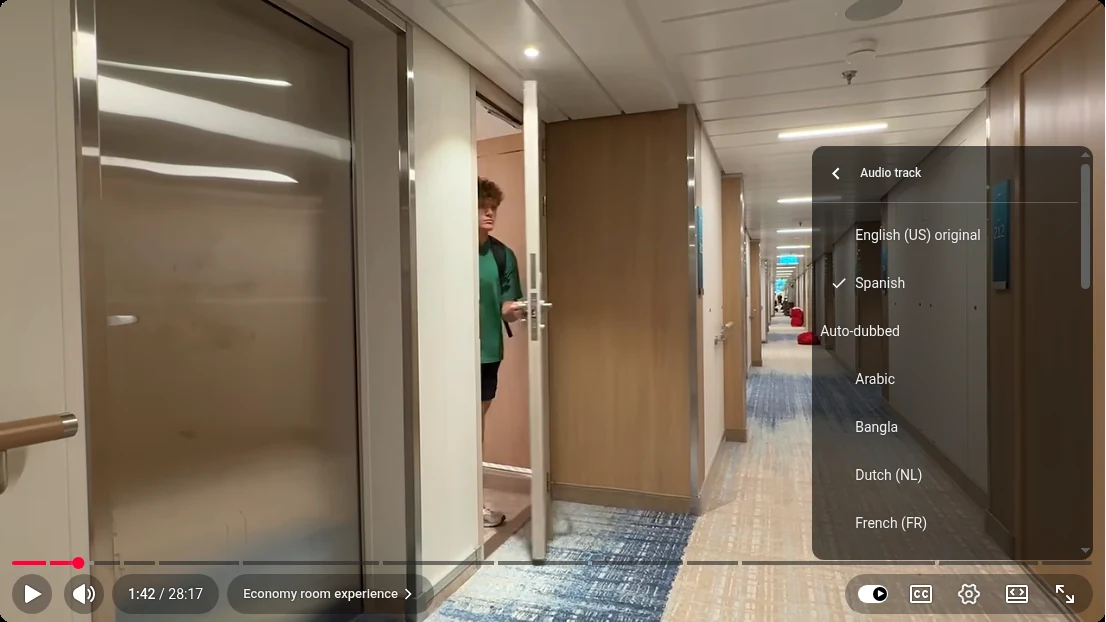
You can listen to both Spanish tracks side by side, with the steps, in Human vs AI Dubbing for YouTube: Which Is Better?.
Where to find auto dubbing in YouTube Studio
- The channel switch. On a computer: Settings, Channel, Advanced settings, the Allow automatic dubbing box. In the YouTube Studio app: your profile picture, Settings, then Automatic dubbing under Content. The option to hear dubs before they go live, Publish manually, sits in the same place.
- The dubs on one video. On a computer only: Content, the video, then Languages. That is where you preview each dub and publish, unpublish or delete it (YouTube Help).
The exact clicks for turning it off, removing an auto dub and uploading your own track in its place: Auto Dubbing Will Soon Be Enabled on Your Channel: What to Do
Lip sync and live dubbing
Lip sync changes the speaker's lip movement to match the dubbed audio. YouTube calls it experimental: early access is open to select channels only, for qualifying videos and languages. If your channel has it, you'll see an Allow experimental lip sync box under Advanced settings (YouTube Help).
Live auto dubbing, which translates your speech in real time on a livestream, is due as a pilot in early 2027, YouTube said at Made on YouTube in September (YouTube Blog). YouTube also says it is building tools so creators can adjust and improve their auto dubs, which today they can't edit at all. What is announced and what is live, in full: Live Auto Dubbing and Lip Sync on YouTube: What's Coming for Creators
How we'd decide
Start with Publish manually rather than switching it off blind. Upload your next video, open the auto dub in your two biggest non-English markets, and listen to the parts that make the video yours: the opening, the jokes, the names, the sponsor read, any moment with two people talking. Then:
- If it sounds fine, publish it and leave auto dubbing on. Watch views by audio track for a few weeks.
- If it sounds wrong in a language that matters, delete the auto dub there and put a human track in its place. Keep the auto dubs for the smaller languages.
- If you're the product, turn it off and dub your main languages with voice actors.
A human dub at HVO is real voice actors you pick from auditions, the same actor for every recurring speaker, a native translator plus a second check on the script, a studio mix with your music and effects, and a native-speaker check of every language. It usually takes 7–10 days for a regular long video, and comes back with subtitles and translated titles, descriptions and thumbnail text. Since mid-2025 we've dubbed 1,000+ videos for 30+ creator channels, including Dude Perfect, Preston and Nick DiGiovanni. How it works in full: YouTube Dubbing Services: How Human Dubbing Works.
To see what a human track for your videos would cost, try the dubbing calculator, or book a call and we'll go through which videos and languages are worth it.
Questions creators ask
Is auto dubbing on YouTube good?
For reach, yes: YouTube says it doesn't hurt your original video's discovery and can help in other languages. For quality, it depends on the video. YouTube itself warns of mistakes with accents, names, idioms and matching the speaker's voice, so it suits information-first videos better than personality-led ones.
Does auto dubbing hurt YouTube views?
YouTube says there is "no negative impact on your original video's discovery algorithm". It doesn't publish how dubbed viewers react to the voice itself, so check views and watch time by audio track in YouTube Studio for your own channel.
Can I check auto dubs before they go live?
Yes. Choose Publish manually in the automatic dubbing settings. Dubs are still made, but you preview each one in YouTube Studio under Languages and publish it yourself.
Which languages does YouTube auto dubbing support?
YouTube says 27 languages in total. For English videos, its help page lists 20, including Spanish, Portuguese, French, Hindi, Indonesian, German, Japanese and Korean. Vietnamese, Turkish, Thai and Urdu are not on that list.
Does YouTube auto dubbing have lip sync?
Only as an experiment. Lip sync is in early access for select channels, for qualifying videos and languages, and appears as an "Allow experimental lip sync" setting if your channel has it.
Can I use auto dubbing and human dubbing on the same video?
Yes. Delete the auto dub in the language you want to replace, upload your human track there, and keep the auto dubs in the other languages.